How to organize Saved Messages in Telegram
Saved Messages starts as a handy pocket and ends as a drawer: files next to shopping lists next to links you meant to read. Telegram has tools for it that many people have never opened. Start with them.
What Telegram itself gives you
View as chats. Tap the title of Saved Messages and switch the view: your saved messages are grouped by the chat they were forwarded from. Everything from one person or channel is together, and you can pin the ones you open most.
The tabs of shared content. Like any chat, Saved Messages has tabs for media, files and links. If you are looking for a document, the files tab skips everything else.
Search. The search inside Saved Messages looks through what you saved; with a part of a file's name it is usually enough.
Tags. A saved message can be given a tag and found by it later. Tags in Saved Messages are part of Telegram Premium.
Folders. There are none inside Saved Messages: as of October 2026 Telegram does not offer them. Telegram's folders sort chats, not the messages of one chat. The closest things to folders are the chats view and tags.
Habits that keep it usable
- One message, one thing. A file with a line of text under it — what it is and whom it is from — is found a year later. A file alone is not.
- Name files before sending them to yourself. Search goes by the name of a file and the text beside it.
- Delete what has served. A boarding pass from last year only gets in the way.
- Do not mix kinds. Notes to self and documents you must keep are different things; when they share one feed, both are harder to find.
A separate place for files
The last habit is the hardest to keep inside Saved Messages, because it is one feed. This is where a catalog helps: the files go there, and Saved Messages is left for notes and links.
ShelfKit is a catalog for files inside Telegram. You forward a file to the bot, and in the Mini App you give it a folder and tags; later you search by name and tags, and the bot sends the file back to your chat. Folders and tags are in the free plan: up to 150 files and 3 folders.
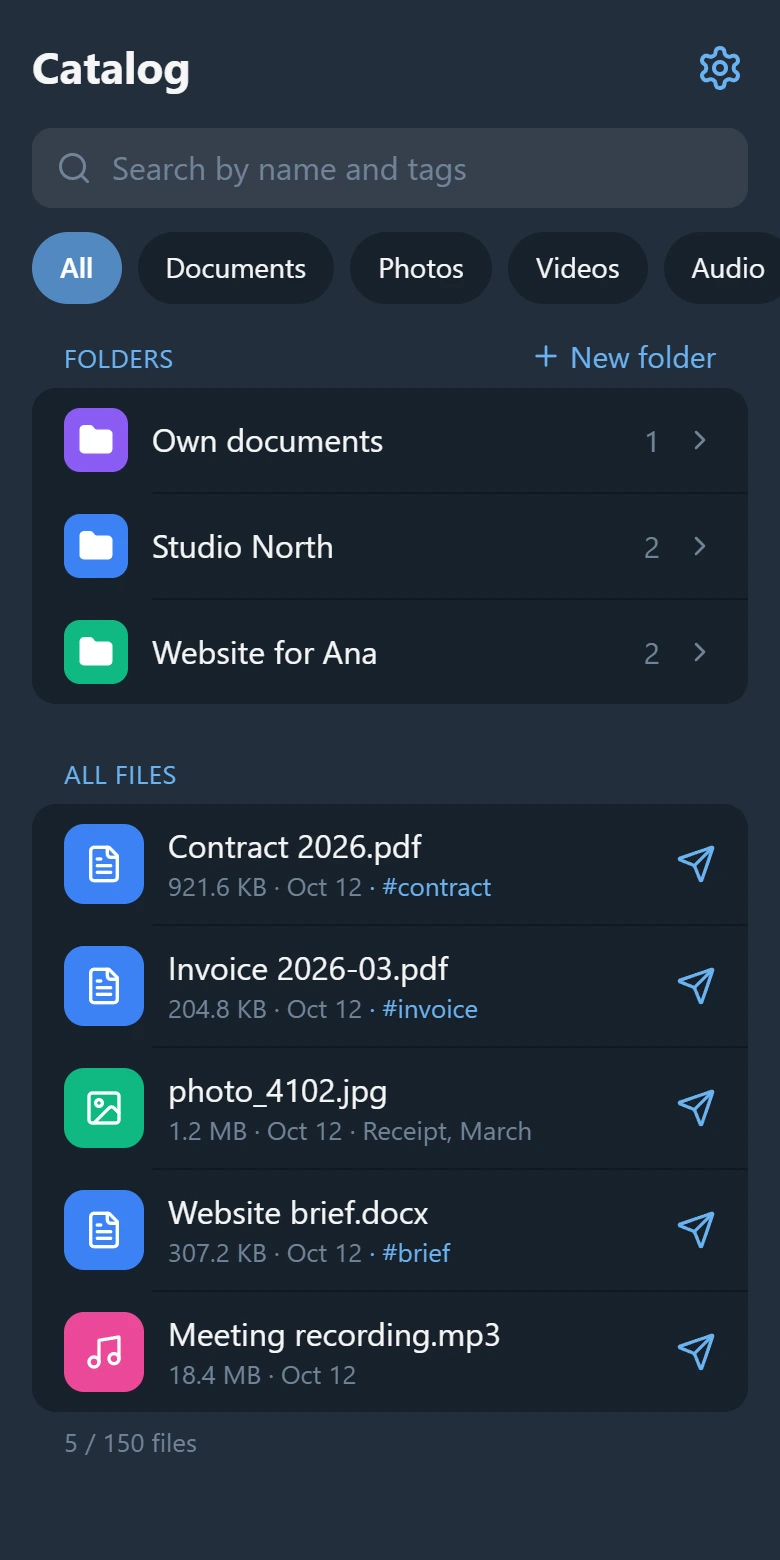
What to know before you move anything:
- ShelfKit does not read your Saved Messages. A file gets into the catalog when you forward it to the bot yourself, one or several at a time.
- The files stay in Telegram. ShelfKit keeps an index: the name, type, size and a reference to the message.
- It is not a backup. If the message with the file is deleted in Telegram, the catalog is left with an entry it cannot open.
- It does not look inside documents; search goes by name, folder, tag and type.
Open ShelfKit in Telegram and forward the first few files — the ones you look for most often.
See also: how to find a file in Telegram.