How to find files in Telegram
Telegram keeps everything you were ever sent, which is exactly why a contract from last spring is so hard to find: it is somewhere among thousands of messages. Before you scroll, try the places Telegram itself gives you. They are quicker than they look.
1. The files of one chat
If you remember who sent the file, open that chat and tap its name at the top. The chat's page has tabs for what was shared in it: media, files, links, voice messages. The files tab lists every document of the chat, newest first.
This is the fastest way when the chat is known. It does not help when the file could have come from any of five people.
2. Search with a filter
Telegram's search can be narrowed to a kind of thing — files, media, links, music — and further to a period of time or to one person or chat. Type a part of the file's name, pick the filter for files, and add the month if you remember it.
It looks at the names of files and at the text of the messages they came with. A scan called "IMG_2041.pdf", sent without a word, will not be found by "contract": nothing about it says so.
3. Saved Messages
Many people forward important files to Saved Messages, and many of them stop finding anything there after a year. Two things help:
- View as chats. Saved Messages can be shown as a list of the chats the messages were forwarded from, so "the file from the landlord" is one tap away.
- Tags. A saved message can be given a tag and found by it in search. Tags in Saved Messages are a Telegram Premium feature.
What makes files findable
- Name the file before you send it. "Lease-2026.pdf" is found by search; "Document (3).pdf" is not.
- Forward it somewhere on purpose the day you get it, not the day you need it.
- Keep one place for the files you will need again.
When that is not enough
If files reach you from many chats and you need them again and again, a catalog is easier than a search. ShelfKit is one inside Telegram:
- You forward a file to the bot — a document, photo, video or audio.
- In the Mini App you put it into a folder and give it tags.
- You search by name and tags, or filter by file type.
- You tap the file, and the bot sends it to your chat.
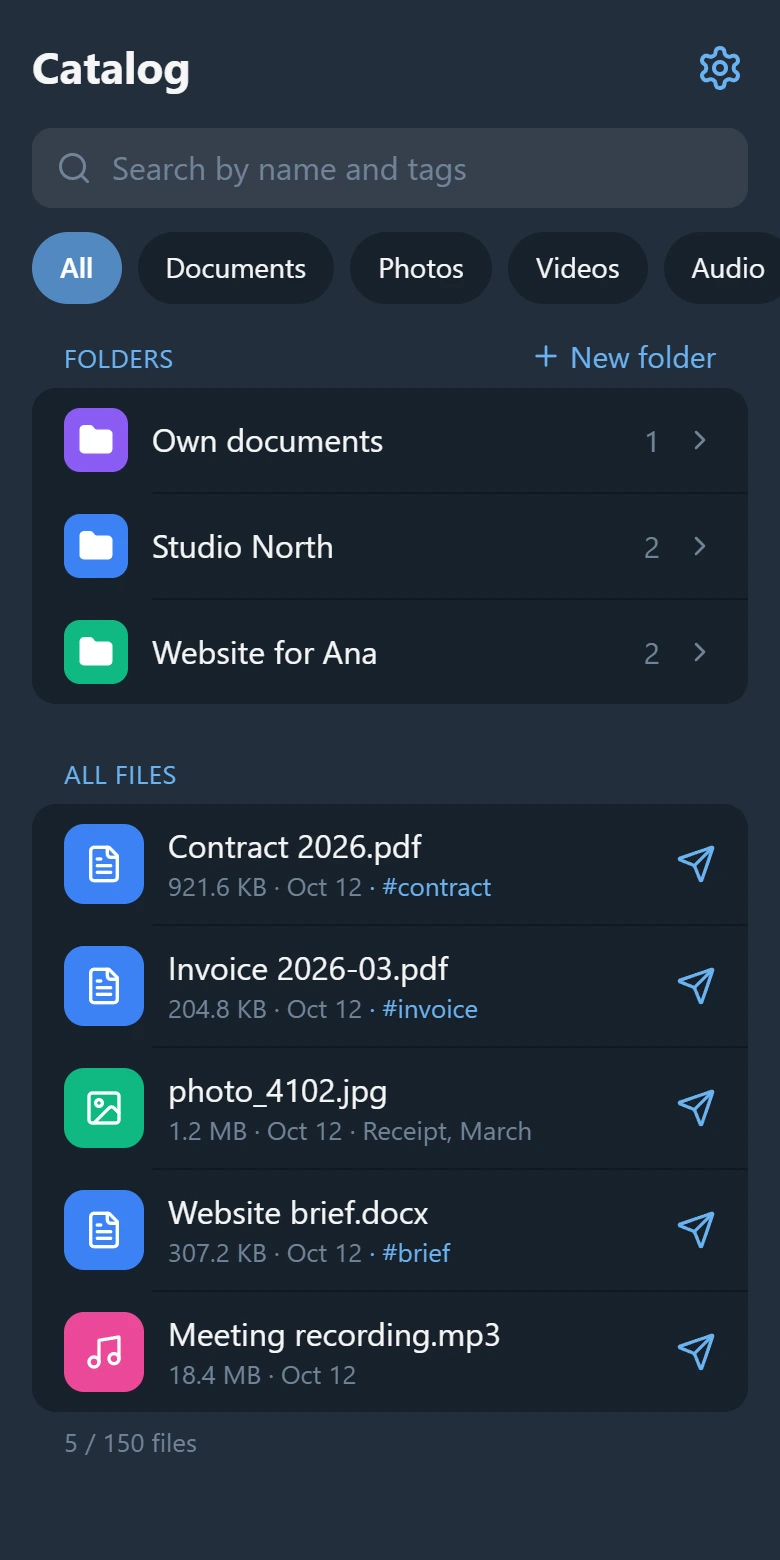
The files themselves stay in Telegram: ShelfKit keeps only an index — the name, type, size and a reference to the message. That has consequences worth knowing. Only what you forward gets into the catalog; ShelfKit does not read your chats or Saved Messages. It does not search inside documents. And it is not a backup: if the message with the file is deleted in Telegram, only the entry is left.
The catalog is free for up to 150 files and 3 folders, tags included. Open ShelfKit in Telegram.